Know the moment a client opens your proposal
Short answer: Send the proposal as a HelpRange link instead of an attachment and you get an alert the moment the client opens it, with the time spent on every page. Tracked links are free (30 views a month); Pro is $39 per team a month with no per-user fees.
Send your proposal as a link instead of an attachment. You get an alert when the client opens it and see which pages they read, for how long, and who else at their company joined in – so you call at the right moment, about the right page. Your whole team, one price – no per-user fees, no proposal limits.
Sent in 30 seconds
Upload the proposal and its link is ready to paste into your e-mail. No setup, no templates to rebuild, no sales call.
One link for the whole offer
Put the proposal, price list, deck and contract in one folder and send the folder link: the client opens every file from one page, and you see which ones they read.
Easy to read on a phone
The proposal opens in the browser on any phone, tablet or computer – nothing to install. Clients who prefer an app can use HelpRange for iPhone, iPad and Android.
A link, not a heavy attachment
A short link instead of a 10 MB PDF keeps your e-mail light, so it is less likely to hit size limits or spam filters.
Every open, logged in your CRM
Connect HubSpot, Pipedrive, Close CRM, Attio, Copper or Freshsales with one key: every open and every accepted offer becomes a note on the contact. Slack alerts and webhooks for anything else.
The client accepts on the link
Put an offer page in front of the proposal – your message, a price summary and “Accept offer” / “Request contact” buttons. You get an e-mail with the client’s engagement score when they click.
A new offer drafted from your last one
Upload your last offer and describe the new one: the AI offer generator writes a draft with the same sections and a price table, and nothing is created or sent before you confirm.
Personal for every client
Ask for the client’s e-mail before the proposal opens, put that e-mail on every page of your price list, show your own logo (Pro) and use your own domain (Unlimited).
What you see after you hit send
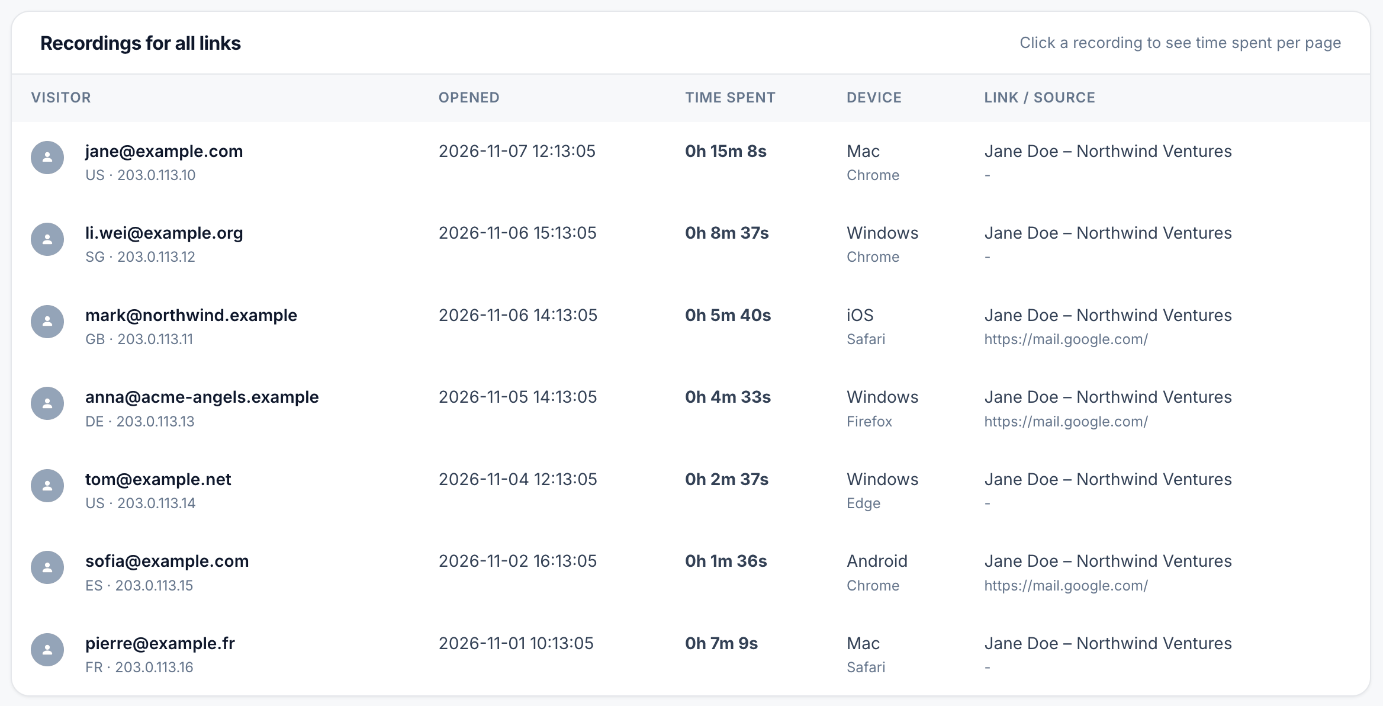
Who opened it, when and on which device
Every visit with the viewer’s e-mail, country, device and the link it came from. A new e-mail from the client’s company means your proposal was passed to a colleague.
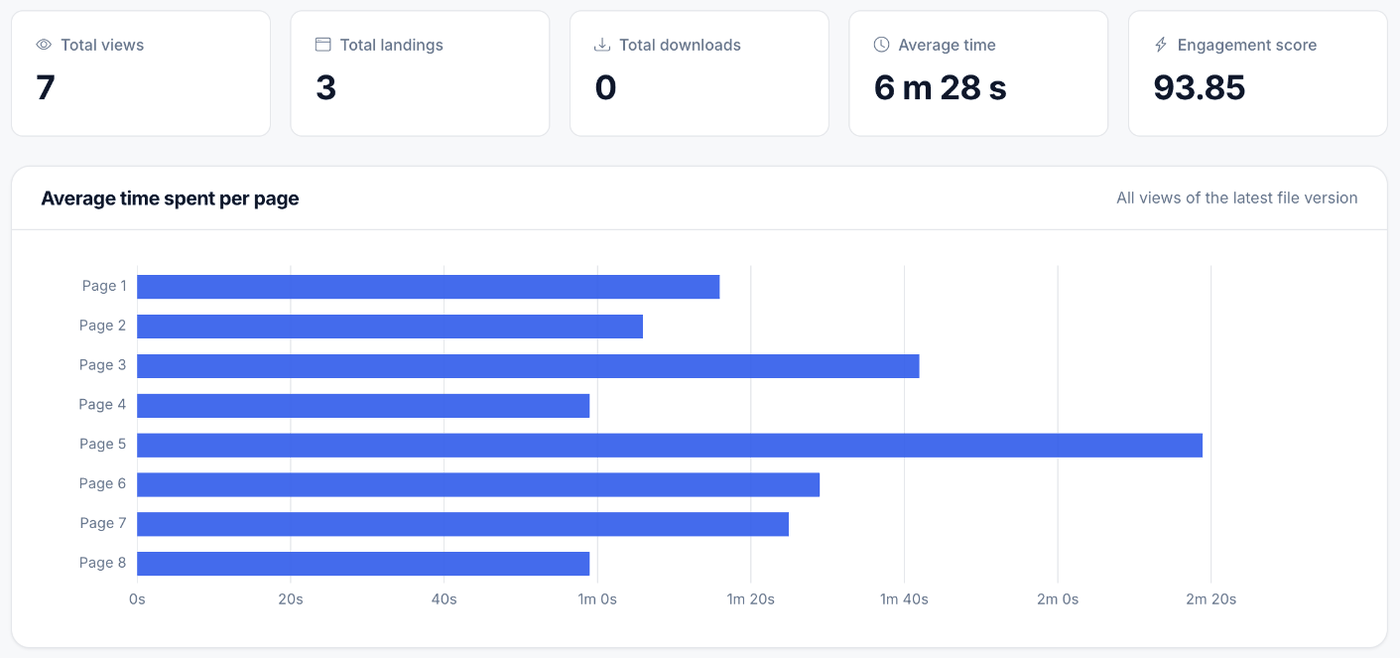
Time on every page
Four minutes on pricing and ten seconds on the case studies tells you what the call should be about. Open a single visit to see its own pages – a client who comes back straight to the pricing page shows up there.
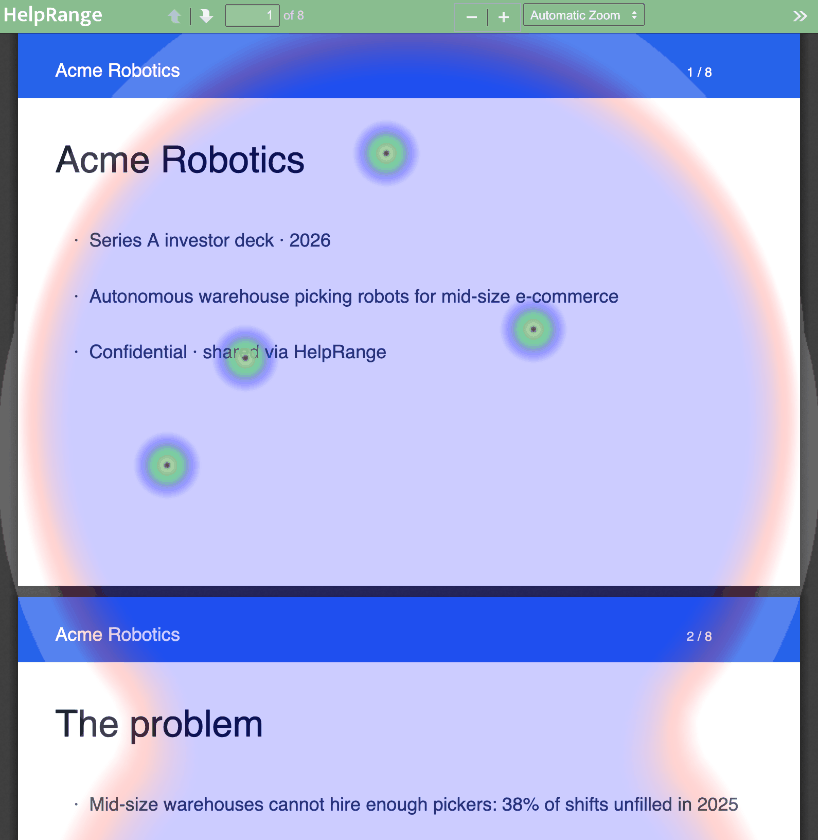
Heatmaps and visit replay
The heatmap shows where readers looked on each page; the replay plays a visit back – scrolling and page turns as the client saw them.
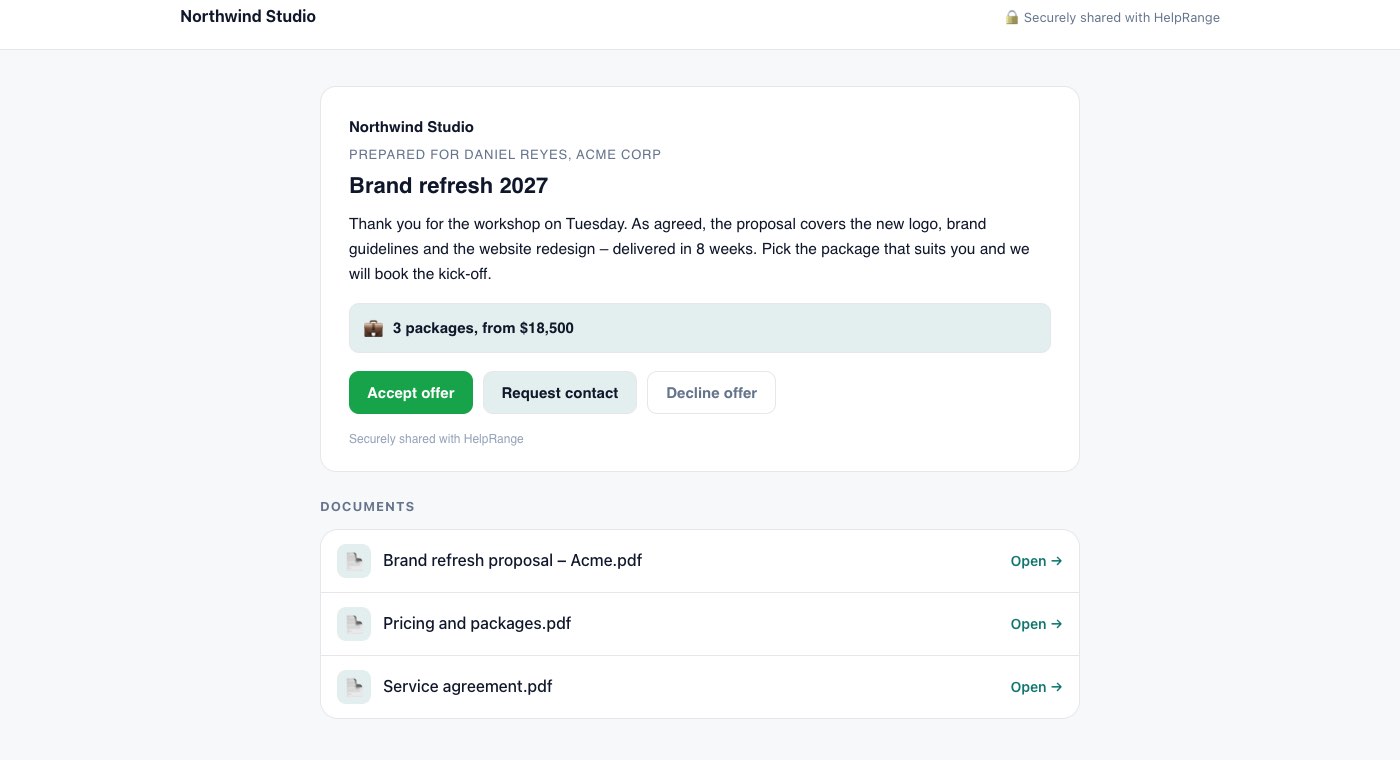
An offer page with “Accept offer”
The client sees your logo, their name, your message and a price summary before the proposal – and can accept the offer or ask you to get in touch.
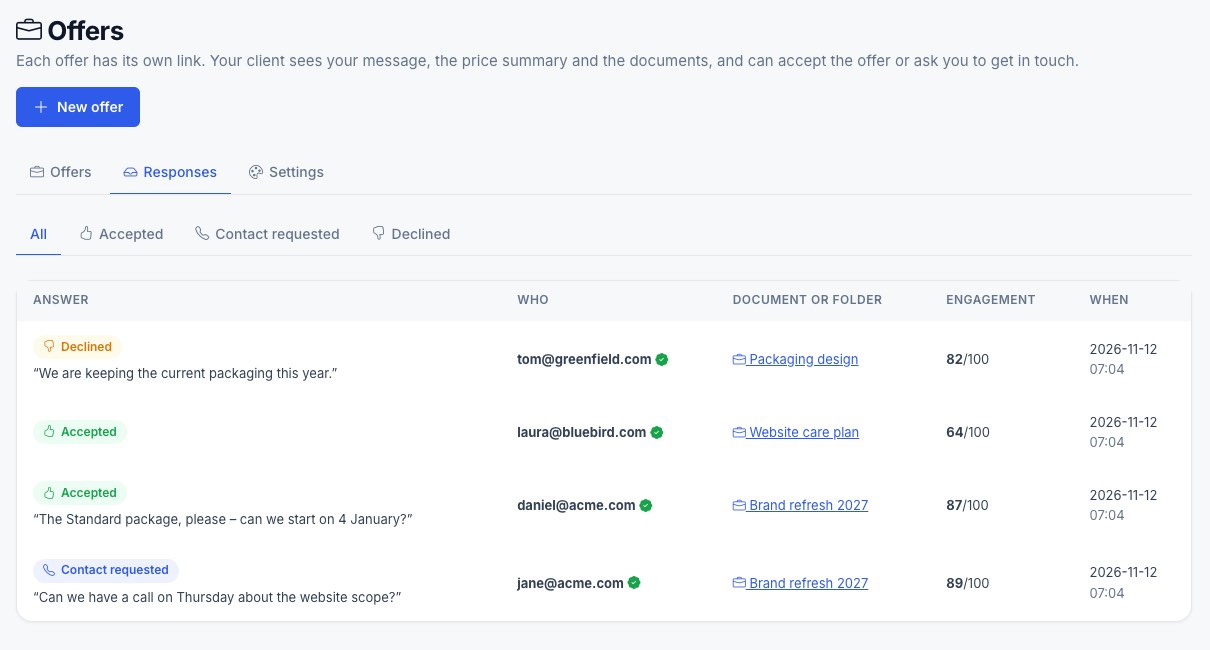
Engagement score for every recipient
Every acceptance and contact request in one list, with an engagement score from 0 to 100 for each recipient – call the most engaged client first.
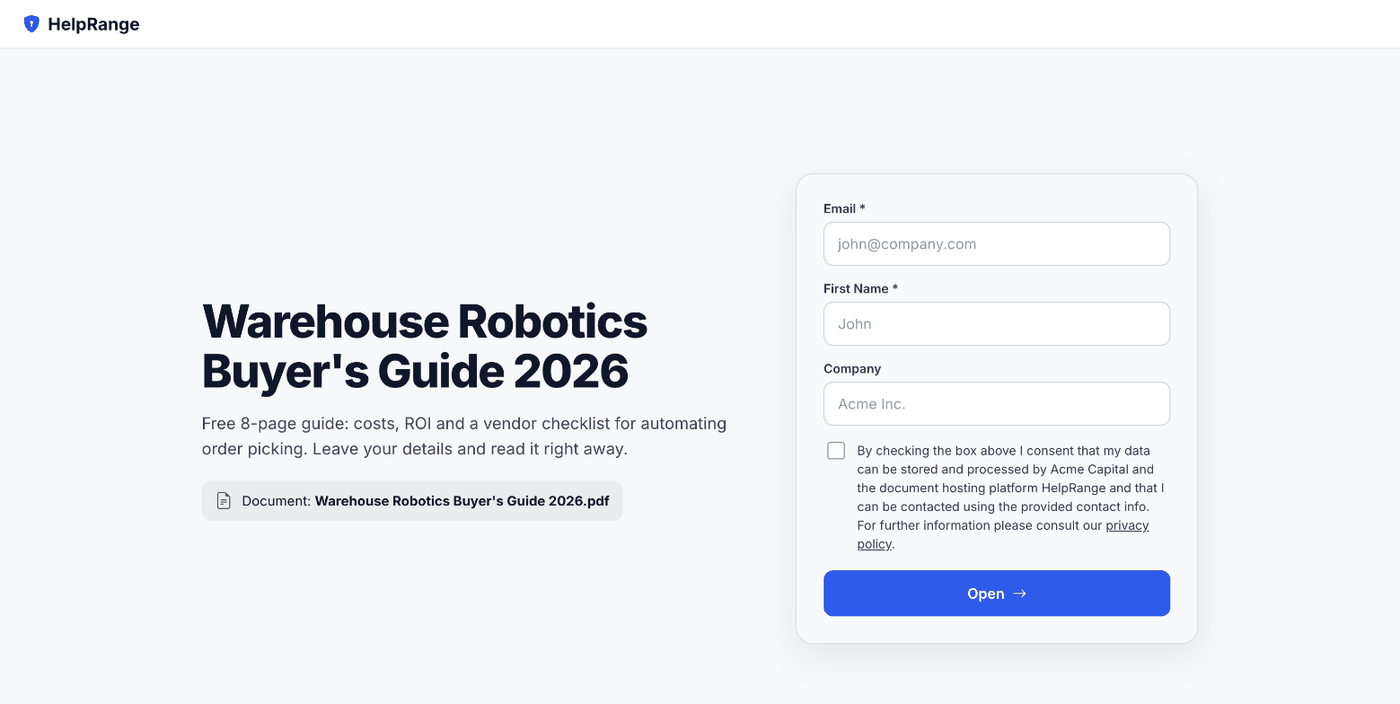
An e-mail gate before the document
Ask for e-mail, name and company before a price list or brochure opens. Every reader becomes a contact you can follow up with.
Alerts, protection and teamwork
Instant notifications
An e-mail when your proposal is opened (grouped, so a busy afternoon does not flood your inbox), and a Slack message or webhook event on every open.
See forwarding – or stop it
A forwarded link shows up as a new viewer, and an alert flags a link opened from many places. Require a confirmed e-mail and a forwarded link alone will not open.
Price lists that stay yours
The viewer’s e-mail as a watermark on every page, download and print off, an expiry date or a view limit – and switch the link off when the offer ends.
Fix it after sending
Change a price or a typo, upload the new version, and the same link shows it – no “please use version 2” e-mail.
Built for the whole sales team
Invite every salesperson to one team and share folders, so everyone sees who opened which offer. Pro is $39 a month for the team, however many people you add.
Quotes your client can configure, sign and accept
Price table with optional items
Line items with quantity, unit price, discount and tax in your currency. Mark items as optional or let the client change the quantity: totals update as they click, HelpRange recalculates them on acceptance and saves the configuration the client chose.
Accept by e-signature
Switch on “Require signature to accept”: the client types their full name and e-mail, agrees to sign electronically and types or draws a signature. You get a PDF certificate with the accepted lines and totals, the time, IP address and a SHA-256 fingerprint – a simple electronic signature.
Offer templates & block editor
Build the offer page from blocks – heading, text, list, image, price table, terms, signature and payment – with a live preview; the PDF is made from the same blocks. Save any offer as a template and start the next one from it.
Automatic reminders
Off until you switch them on: a reminder when nobody has opened the offer after a number of days, or when it was opened but not answered. Every recipient who has not answered gets an e-mail from you, at most two reminders per offer, and “Stop reminders” ends them in one click.
Several recipients per offer
Send one offer to the CEO, the CFO and procurement – up to 20 people, each with a personal link. See who opened it, how often, when they last opened it, how long they read and who accepted.
Quote numbers
Every new offer gets the next number – OF/2026/001 by default, or your own format – on the offer page, the PDF and the e-mails.
Per-user proposal tools vs one team price (prices read 8 November 2026)
| Tool | Billed per | List price, billed monthly | Team of 5, a month, billed yearly | Limits and notes |
|---|---|---|---|---|
| Sellizer Team | User | $35 per user | $140 ($28 per user) | 400 proposals and 400 SMS a month; heatmaps, session recording and SMS alerts listed (sellizer.com/pricing) |
| Sellizer Solo | User | $22 | One user only ($17.60 billed yearly) | 100 proposals and 100 SMS a month |
| DocSend Standard | User | $65 per user | $225 ($45 per user) | Tracked links and analytics; prices as read 7 November 2026 (docsend.com/pricing) |
| PandaDoc Business | Seat | $49 per seat | $245 | Proposal editor and e-signature; recipient analytics from Business up (pandadoc.com/pricing) |
| Proposify Build | User | $49 per user | $195 ($39 per user) | Proposal editor; open alerts and time per section (proposify.com/pricing) |
| Qwilr Starter | User | $49 per user | $175 ($35 per user) | Web-page proposals; 60 days of analytics history (qwilr.com/pricing) |
| HelpRange Pro | Team | $39 for the team | $31 for the whole team | No proposal or user limit; time per page, heatmaps, replay, watermarks, offer page with a price table and e-signature to accept, AI offer generator. No full document editor – you send the PDF you already have. |
PDF, Word, PowerPoint or Excel – the link is created with the upload.
Paste it into your e-mail instead of the attachment: one link per client, or ask for their e-mail first.
An alert when it is opened; then see the pages they read, for how long, and who else joined.
Free: tracked links with page-by-page analytics, 30 views a month. Pro, $39 per team per month: unlimited proposals and views, the e-mail gate, watermarks and download blocking, the offer page with “Accept offer” and the AI offer generator. Your logo: included from Pro; your logo on your own domain: Unlimited, $174 per team. Your whole team, one price – no per-user fees, no proposal limits. Plans & pricing
Proposal tracking – questions
How do I know when a client opens my proposal?
Send the proposal as a HelpRange link instead of an attachment. You get an e-mail – and a Slack message, if you connect Slack – when it is opened, and the statistics show who read it, which pages and for how long.
Can I see if the client forwarded my proposal?
Yes. A forwarded link shows up as a new viewer, with their e-mail if the link asks for one. You can also require a confirmed e-mail, so the forwarded link alone does not open the proposal.
Does the client need an account or an app?
No. The proposal opens in the browser on any device. The apps for iPhone, iPad and Android are optional.
Can the client accept or sign the proposal in HelpRange?
Yes. Make the proposal an offer: your message, an interactive price table and “Accept offer” and “Request contact” buttons – optionally with “Require signature to accept”, so the client signs with a typed or drawn signature and you get a PDF certificate. You get an e-mail with their engagement score, and after accepting the client can see “Pay now” with your own payment link. For a longer contract, send it for e-signature in HelpRange (from Pro).
Can AI write the proposal for me?
Yes, from your own last offer. Upload it, describe the new offer and the AI offer generator writes a draft with the same sections and a price table. Prices, dates and discounts come only from your prompt and template, anything else is highlighted for checking, and you see the PDF and the offer page before you confirm. It is part of Pro and uses the AI requests (50 a month on Pro).
How much does proposal tracking cost?
Free covers tracked links with page-by-page analytics for 30 views a month. Pro is $39 per team per month ($31 billed yearly) with unlimited proposals and views and any number of users. Your logo is included from Pro, your own domain is on Unlimited ($174 per team per month).
Is HelpRange cheaper than Sellizer?
For one person, Sellizer Solo ($22 a month, 100 proposals) costs less than HelpRange Pro ($39). From two salespeople on, HelpRange costs less: Sellizer Team is $35 per user a month ($28 billed yearly) with 400 proposals a month, so five people pay $175 a month, while HelpRange Pro is $39 for the whole team with no proposal limit (sellizer.com/pricing, 8 November 2026). Sellizer also sends SMS alerts; HelpRange does not. The full comparison – features, limits and costs for 1, 5 and 10 salespeople – is on our Sellizer alternative page.
Is it legal to track who reads my proposal?
In the EU, data on how a known person reads a document is personal data. Tell recipients that the document is shared through a tracking service and collect only what you need; an e-mail gate makes the tracking visible to the reader.
Try it on your own documents
7-day free trial, then a free plan. No credit card required.
Start free trial Compare plans – from $39 per team